
SMART IPTV FOR COMPUTER
To activate your membership for Smart IPTV, you will need a laptop or PC, and an internet connection.
- Upon placing the order, an email will be sent to the email you provided.
- The email will contain a link to download your channel’s file.
- Click the link to download the file onto your computer.
Also, Read the Article: “How to get Arabic IPTV“
When the download has completed, follow the steps below:
1-Open the IPTV channels application that you downloaded. You should see the screen as shown below:
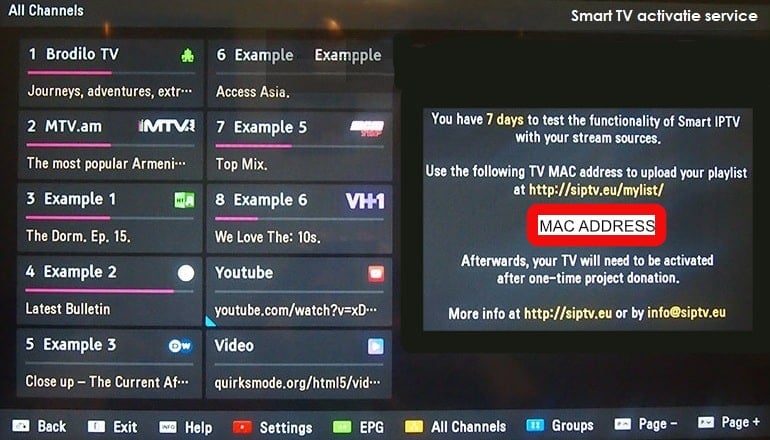
2-Copy your device MAC ADDRESS from the main screen.
3-From your laptop or PC, go to: “https://siptv.app/mylist/“On the website, select “My List.”
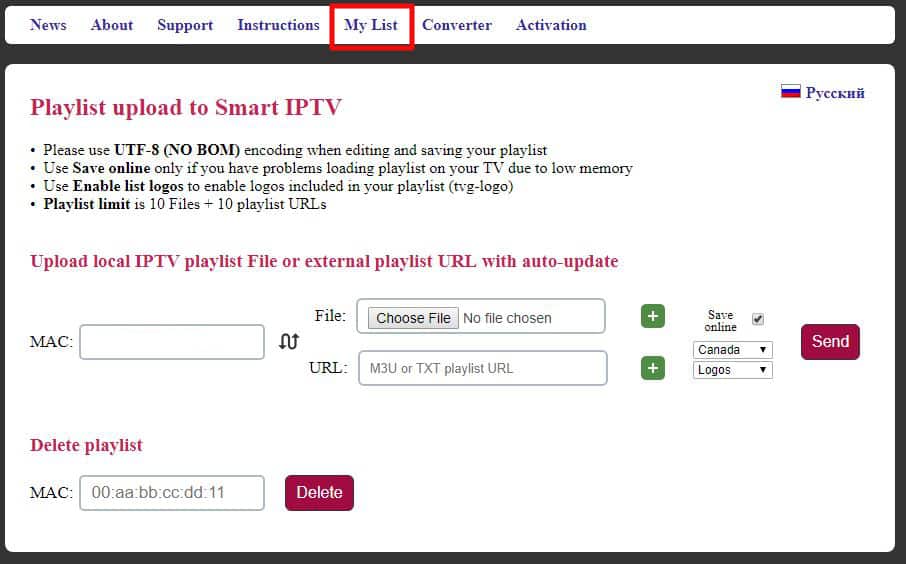
4-Enter the MAC ADDRESS you copied earlier to the MAC address space under “upload local IPTV playlist.”
5- Click on “choose file.”
6- Find and select the IPTV application you downloaded to your computer. Tick the checkbox “save online.”
7-Select your country (if your country is not available, select the closest country to you).
8- Click “send”.
9- Go to your IPTV application, and restart or reload to get the channels list
10- To change the language or country on the channels list, select the groups at the bottom of the page.
For more instructions, visit page: https://siptv.app/howto/
Products
-
 Pink Package
Price range: €1.99 through €91.99
Pink Package
Price range: €1.99 through €91.99
-
 Red Package
Price range: €1.99 through €70.99
Red Package
Price range: €1.99 through €70.99
-
 Purple Package Resellers Plans
Price range: €240.00 through €2,989.99
Purple Package Resellers Plans
Price range: €240.00 through €2,989.99
-
 Blue Package
Price range: €1.99 through €74.99
Blue Package
Price range: €1.99 through €74.99
-
 Green Package
Price range: €1.99 through €69.99
Green Package
Price range: €1.99 through €69.99